Do it yourself

Volumio OS

Build your own music streamer. Volumio OS turns a Raspberry Pi or a PC into a bit-perfect music player, ready in under 10 minutes.

Free

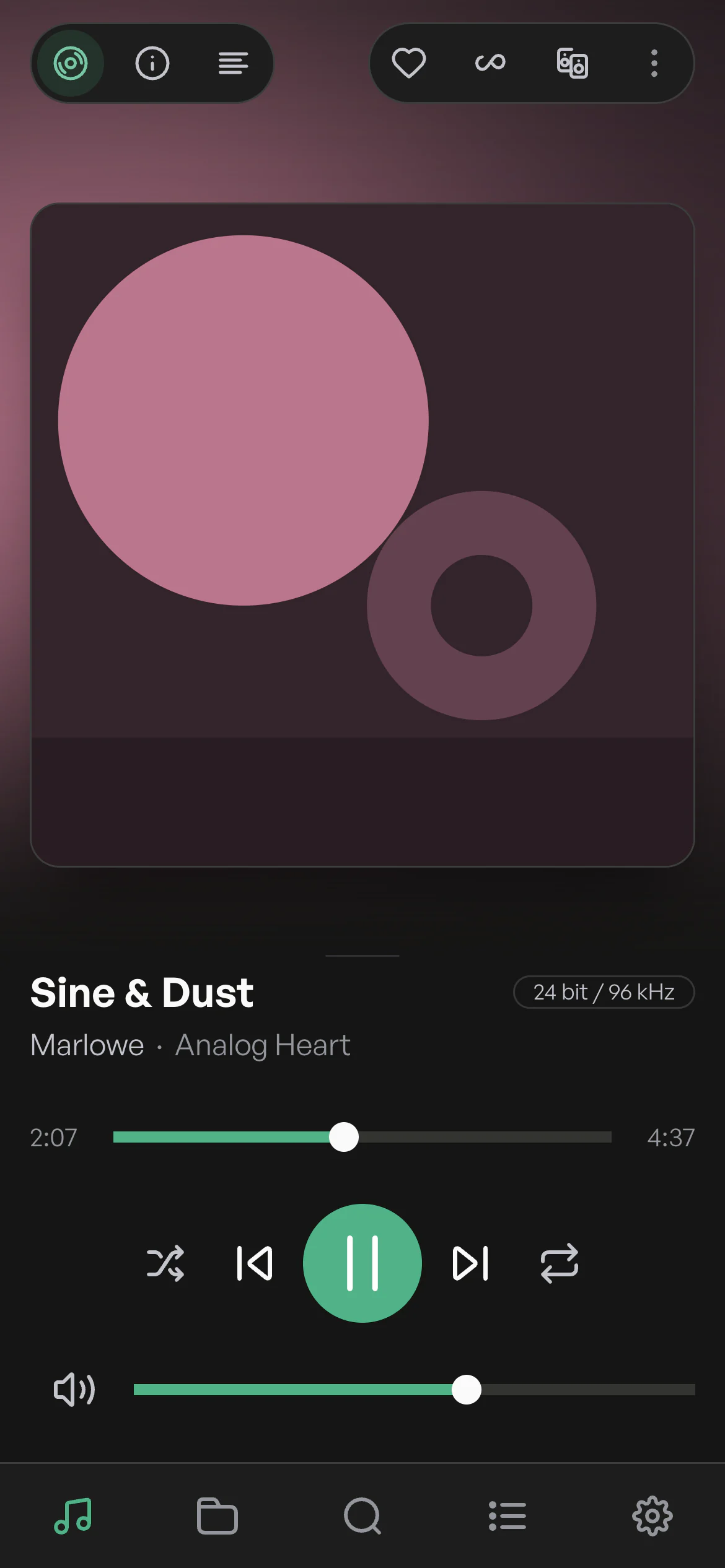
Volumio on a phone, playing an album: the cover, the controls and the volume.
  • Bit-perfect playback
  • Hi-res, up to DSD
  • AirPlay and Spotify Connect
  • Plugins from the community
  • Ready in under 10 minutes
  • Raspberry Pi DAC boards, natively
  • Any USB 2.0 DAC
  • A hotspot for the first setup
  • Bit-perfect playback
  • Hi-res, up to DSD
  • AirPlay and Spotify Connect
  • Plugins from the community
  • Ready in under 10 minutes
  • Raspberry Pi DAC boards, natively
  • Any USB 2.0 DAC
  • A hotspot for the first setup

Easy to start. Plays everything. Bit-perfect.

  • Freeto download and to use, for everyone
  • 10minor less, from download to music
  • 2platforms: Raspberry Pi and PC (x86/x64)
  • DSDand every format down to MP3
  • RAMthe whole system runs from memory
  • 6rooms in perfect sync, with Volumio Premium

Easy to start

From download to music in under 10 minutes

Four steps, and you're ready to enjoy your music.

  1. Step 1: Download

    Get Volumio OS for your Raspberry Pi or PC, then extract the .zip file. Inside is an .img file.

  2. Step 2: Flash

    In Raspberry Pi Imager, choose the .img file and your microSD card, or a USB drive for a PC, then select Write.

  3. Step 3: Plug in

    Put the card or the drive into your device and switch it on.

  4. Step 4: Connect

    In the Volumio app, choose Configure a new device and follow the guided setup. Or open volumio.local in your browser.

Download Volumio OS

Free for everyone. Version 4.119, released 24 March 2026.

By downloading you accept the Terms and Conditions.

Plays everything

All your music, any DAC

Stream your music services, play your own files from MP3 to DSD and tune in to web radio, bit-perfect. Then send it to the DAC you love.

Built in

  • TIDAL (with Volumio Premium)
  • Qobuz (with Volumio Premium)
  • Spotify Connect
  • Highresaudio (with Volumio Premium)
  • AirPlay
  • UPnP and DLNA
  • Web radio
  • Your files
  • USB drives
  • Network drives
  • CDs (with Volumio Premium)
  • Bluetooth (with Volumio Premium)
  • Inputs (with Volumio Premium)
  • Home Assistant

With plugins

  • YouTube
  • YouTube Music
  • SoundCloud
  • Mixcloud
  • Bandcamp
  • Pandora
  • Radio Paradise
  • Podcasts
  • FM and DAB+
  • Jellyfin
  • Plex
  • Subsonic
  • Roon
  • Lyrion
  • Last.fm

Plays to

  • USB DACs
  • Raspberry Pi DAC boards
  • DSD, native or DoP
  • Multiroom (with Volumio Premium)
  • Chromecast (with Volumio Premium)
  • Sonos (with Volumio Premium)
  • Your browser (with Volumio Premium)

On your own hardware, the ones with a dot come with Volumio Premium. How each one works

  • One player for everything

    Your streaming services, your library and web radio come together, in high resolution and bit-perfect.

  • Made for your DAC

    Any USB 2.0 DAC works. Raspberry Pi DAC boards are supported natively, and DSD goes out over DoP.

  • Grows with plugins

    Plugins made by the Volumio community add more sources and features.

  • Every room in sync

    With Volumio Premium, play in perfect sync on up to 6 Volumio players.

Free and Premium

Free to start, Premium when you want more

Volumio OS is free for everyone. Volumio Premium adds TIDAL and Qobuz, multiroom and the smart features, with 14 days free to try it.

For everyone

Volumio OS

Free

  • Bit-perfect playback, with the whole system in RAM
  • FLAC, ALAC, AAC, Vorbis, MP3, DSD and more
  • Any USB 2.0 DAC, and Raspberry Pi DACs natively
  • DSD over PCM (DoP)
  • Network drives (CIFS and NFS), found automatically
  • UPnP and AirPlay playback
  • Web radio directories built in
  • Playlists, alarm and sleep timer
  • A hotspot for the first setup on wireless hardware
Download

14 days free

Volumio Premium

€7.49 a month, or €69.99 a year

  • Everything in Volumio OS
  • Native TIDAL and Qobuz, with TIDAL Connect and Qobuz Connect
  • Super search: AI search and playlists
  • Infinity playback, an AI DJ
  • Related artists and albums, with credits
  • Multiroom sync playback
  • CD playback and ripping
  • Bluetooth playback, digital and analog inputs
  • Highresaudio.com
  • Play here: listen in your browser
  • Up to 6 devices, with remote access
  • Your playlists and favourites synced
Start free trial of Volumio Premium

On a Volumio device, the Premium features are built in, with no subscription. See the devices

Volumio OS

What you need

Runs on

Computers
Raspberry Pi, or a PC (x86/x64)
Installs on
A microSD card, or a USB drive for a PC
Written with
Raspberry Pi Imager
Control
The Volumio app for iPhone and Android, or volumio.local in a browser
First setup
A hotspot, on wireless hardware

Plays

Files
FLAC, ALAC, AAC, Vorbis, MP3, DSD and more
Network
CIFS and NFS drives, found automatically
Streaming
UPnP and AirPlay; TIDAL and Qobuz with Premium
Radio
Web radio directories, built in
Outputs
Any USB 2.0 DAC, Raspberry Pi DAC boards, DSD over PCM (DoP)

Under the hood

System
Debian Bookworm, with the latest Linux kernel
Player
The latest MPD
Memory
The whole system runs from RAM
Plugins
Made by the Volumio community
Languages
A multi-language interface

To get started

  • A Raspberry Pi or a PC
  • A microSD card, or a USB drive for a PC
  • Raspberry Pi Imager, to write Volumio OS
  • A DAC, an amplifier and speakers
  • Your phone or a browser
See the four steps

From volumio.com/get-started and The new Volumio page, October 2026.

Plug and play

Rather plug in and play?

Volumio devices are ready the moment you plug them in. Designed and assembled in Florence, with the Premium features built in.

FAQ

Questions and answers

Is Volumio OS free?

Yes. Volumio OS is free to download and to use. Volumio Premium adds TIDAL, Qobuz, multiroom, CD playback and more, with 14 days free to try it.

What do I need to get started?

A Raspberry Pi or a PC, a microSD card (or a USB drive for a PC) and Raspberry Pi Imager to write Volumio OS to it. Then your phone or a browser to set it up.

Which DACs work with Volumio OS?

Any USB 2.0 DAC. Raspberry Pi DAC boards are supported natively, and DSD plays over DoP.

How do I control it?

With the Volumio app for iPhone and Android: choose Configure a new device and follow the guided setup. Or open volumio.local in a browser on your computer or tablet.

Can I play TIDAL and Qobuz?

Yes, with Volumio Premium: native TIDAL and Qobuz, plus TIDAL Connect and Qobuz Connect.

On how many devices can I use Premium?

Up to 6, with multiroom sync and remote access.

How is this different from a Volumio device?

Volumio devices need no setup skills: they are designed and assembled in Florence, with the Premium features built in and no subscription. Volumio OS builds a player on hardware you already have. See the devices

Ready to build yours?

Free

Volumio OS 4.119, for Raspberry Pi and PC.

Download

Help and community